

Why the Kodak PixPro FZ55 Digital Camera is Booming Today
The photography landscape is shifting dramatically toward intentional, physical devices. Consumers are actively moving away from the complex world of computational smartphone applications. Therefore, dedicated point-and-shoot options are experiencing a massive structural resurgence in the current market.
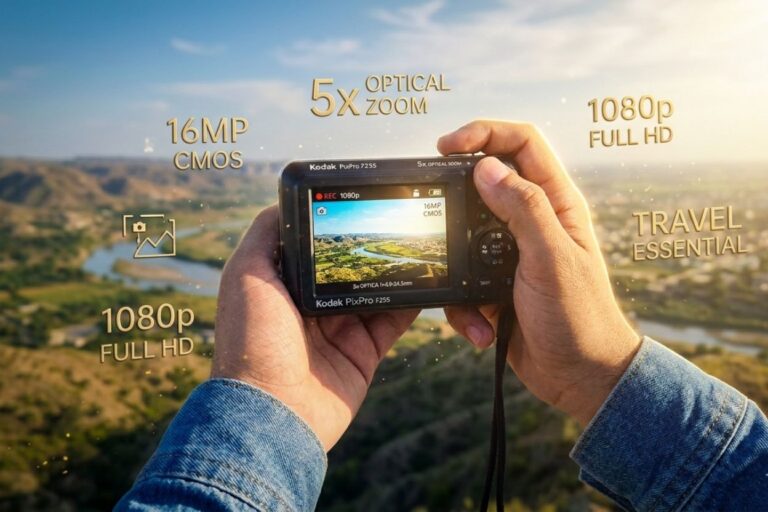
Surprisingly, recent retail analytics reveal that this 16MP pocket camera has climbed to the top of global sales charts. The sleek and highly portable kodak pixpro fz55 stands directly at the center of this cultural trend. Users genuinely appreciate its straightforward operation because the system lacks confusing software updates or forced cloud storage accounts. Consequently, casual shooters can focus entirely on framing beautiful moments without digital distractions.
Modern smartphone lenses often lean heavily on aggressive artificial sharpening algorithms. In contrast, this dedicated camera uses its optical design to deliver a softer, more classic visual profile. This article provides a comprehensive kodak pixpro fz55 review to help you evaluate if this budget-friendly camera fits your daily creative lifestyle.
Technical Specifications Analysis
Understanding the device’s core internal components will help you maximize its creative output. The engineering choices prioritize compact physical dimensions while maintaining reliable day-to-day functionality.
Core Architecture and Physical Sensor Dimensions
A sharp 16.76-megapixel CMOS sensor handles image processing inside the compact plastic housing. Specifically, the component uses a standard 1/2.3-inch format measuring roughly 6.17 by 4.55 millimeters. Therefore, the device captures sufficient detail for standard physical prints or for high-quality social media sharing.
Implementing a CMOS sensor provides excellent power efficiency compared to older CCD alternatives. In addition, this silicon architecture enables faster startup and zippy shot-to-shot processing. Because the system draws minimal electricity, you can confidently shoot throughout long afternoon excursions without anxiety.
Optical Lens and Zoom Versatility
The physical lens assembly features a versatile 5x optical zoom mechanism. This system offers a 35mm-equivalent focal length range of 28mm to 140mm. As a result, users can easily snap panoramic landscapes or pull distant physical subjects significantly closer.
Digital zooming and cropping on smartphones simply degrade your overall file resolution. However, the physical elements inside the kodak pixpro fz55 digital camera mechanically adjust to preserve detail. The maximum aperture varies dynamically from f/3.1 at wide angles down to f/6.8 when fully extended.
Display Performance and Daily Body Ergonomics
The external controls and viewable surfaces dictate how the device handles in dynamic shooting environments. For instance, the physical form factor emphasizes maximum pocketability.
Navigating the Rear Panel and Menu System
A fixed 2.7-inch LCD screen sits securely on the chassis’s rear panel. The display features a modest 230k-dot resolution, which is sufficient for standard menu navigation. However, under direct, blazing sunlight, you might need to cup your hand to read the settings clearly.
The interface lacks modern touchscreen functionality entirely. Instead, tactile mechanical buttons line the right side of the screen to supply crisp physical confirmation. This layout allows for rapid adjustments because the user does not have to fumble with complex capacitive glass panels.
Form Factor and Weight Distribution
The entire unit weighs a featherweight 106 grams without its battery. Because the shell measures only 3.6 inches wide, it effortlessly fits into small denim pockets or jacket slots. A smooth metallic faceplate wraps around the front side to deliver an appealing, understated appearance.
The slender design lacks a deep, pronounced rubberized handgrip on the main body. Therefore, using a secure wrist strap is an excellent way to prevent accidental physical drops during fast movements. The smooth texture feels durable and actively resists ugly fingerprints or superficial scuffing over time.
Memory Architecture and Storage Setup
Selecting the appropriate data storage media prevents frustrating execution bottlenecks during extensive shooting sessions. The physical memory interface requires special attention during your initial setup.
Selecting the Proper Memory Storage Type
The internal compartment features a single expansion slot that supports Secure Digital media. Specifically, the architecture supports standard SD, SDHC, and high-capacity SDXC variants. For optimal performance across all tracking modes, utilizing a reliable kodak pixpro fz55 sd card configuration is vital.
Internal controllers can technically recognize extended-capacity storage media up to 512 GB. However, intermediate sizes like 32GB or 64GB cards often represent the sweetest spot for file system stability. These capacities easily hold thousands of high-resolution JPEG files without straining the camera’s simple processing chip. Some large 128GB cards may encounter issues if formatting is skipped, so sticking to optimized cards is safer.
Formatting Protocols and Firmware Integrity
Formatting your storage media directly within the camera menu system before your initial shoot is highly recommended. Because this step creates a clean FAT32 directory structure, it eliminates potential write errors and card corruption. Furthermore, choosing a Class 10 or UHS-I speed class ensures seamless Full HD video recording.
To maintain total system stability and card compatibility, ensure your camera runs the latest V1.0.6 firmware or above. You can easily transfer the required file via a computer to patch the internal coding. This quick step ensures files write correctly during long, intense photo sessions.
Image Performance and Light Sensitivity
Evaluating how the sensor renders color and handles noise helps you identify optimal conditions for capturing stunning images. The hardware delivers distinct visual characteristics depending on ambient illumination levels.
Daylight Capture and Color Chemistry
The device truly shines in bright, natural daylight. In these scenarios, the processing engine delivers vibrant, punchy colors that instantly evoke the iconic Kodak film heritage. Blue skies look deep and rich, while green foliage retains an appealing, natural saturation level straight out of the camera.
The central portion of the frame displays crisp, satisfying sharpness when utilizing mid-range focal steps. The automatic exposure system efficiently calculates scene values using artificial intelligence algorithms. For example, it effortlessly balances shifting lighting patterns when tracking outdoor activities or street sceneries.
Managing Low Light and High Sensitivity Noise
The native sensitivity scale spans from a base ISO 100 up to a maximum of ISO 3200. In well-lit rooms, keeping the setting below ISO 440 yields clean results with minimal digital artifacts. However, because the physical sensor area is compact, luminance noise begins to creep into dark shadow areas around ISO 800.
When twilight arrives, utilizing the integrated Xenon flash helps illuminate nearby subjects up to two meters away. Alternatively, mounting the device on a sturdy physical tripod allows the electronic shutter to remain open for several seconds. This method keeps the native ISO low to ensure clean, atmospheric night landscape exposures.
Video Recording and Audio Capture Features
Moving beyond static image capture, this compact point-and-shoot camera includes dedicated tools for recording continuous-motion clips. A standalone red button on the back plate instantly initializes movie mode.
Resolution Formats and Framework Limits
The internal recorder produces crisp 1080p Full HD video files operating at 29.97 frames per second. The video data saves directly into a universal MOV file wrapper that uses accessible compression profiles. Consequently, you can readily drop these clips into standard editing applications without needing heavy conversion steps.
The lens elements can mechanically move and adjust focus while video capture is actively running. Because the system relies on digital image stabilization rather than optical shifting mechanisms, keeping a steady hand is crucial. Framing your cinematic clips while bracing your elbows against your torso creates remarkably smoother panning movements.
Audio Tracking and File Capping Secrets
An integrated microphone efficiently captures ambient audio during your recording sessions. Because the capsule lacks built-in wind attenuation filters, recording outdoors during breezy weather can introduce background rustle. Therefore, capturing family interviews or close-range vlogs in shielded or indoor spaces delivers the absolute cleanest vocal tracks.
When filming long events, the internal file system automatically caps individual files at 4 GB. This equates to roughly 22 to 25 minutes of continuous 1080p footage per clip. Fortunately, the system automatically creates a brand-new file segment right away without interrupting your live recording.
Battery Management and Charging Workflows
Maintaining a continuous supply of electrical power ensures that you never miss an unexpected creative opportunity. The internal power engineering balances physical weight reduction against reliable daily performance.
Charging Protocols and Battery Longevity
The camera utilizes a removable, rechargeable LB-012 lithium-ion battery pack rated at 3.7 volts. A single, full charge cycle supplies enough energy to capture approximately 200 static images. This longevity meets industry standards for ultra-compact consumer point-and-shoot systems.
Replenishing the internal cell requires connecting the supplied Micro-USB 2.0 cable directly into the side interface port. Because the power architecture supports internal charging workflows, you can feed the camera using standard portable power banks. This feature is immensely valuable for travel enthusiasts who spend long days far away from traditional AC wall outlets.
Smart Power Preservation Methods
An adjustable auto-power-off utility automatically powers down the system after periods of physical inactivity. You can set this interval to 1, 3, or 5 minutes in the setup menu. This automated safety measure preserves valuable cell capacity when the camera sits quietly inside your travel bag.
Comparative Market Analysis
Placing this budget-friendly point-and-shoot camera alongside alternative modern capture solutions helps clarify its exact market position. The unit serves a highly specific niche in the current imaging ecosystem.
Point-and-Shoot Cameras Versus Modern Smartphones
Premium modern smartphones utilize heavy computational software layers to synthesize artificial background blur and HDR tones. However, these systems often strip away the authentic grain and texture of physical photography. The kodak pixpro fz55 digital camera uses actual glass elements to collect light natively across its sensor surface.
Furthermore, smartphones constantly interrupt your creative workflow with stressful text notifications, email alerts, and incoming calls. Choosing a dedicated, single-purpose imaging tool lets you immerse yourself entirely in the artistic process. The device also extends your phone’s battery life for vital navigation and emergency communication.
Evaluating the Mainstream Appeal of Simplicity
Many consumers select this model because it fundamentally eliminates the stress of digital over-connectivity. Parents frequently purchase the unit as a safe, distraction-free creative tool for young children or teenagers. In addition, senior citizens appreciate the prominent physical buttons that make documentation simple and rewarding.
Optimizing Menu Settings for Premium Results
Adjusting a handful of default factory settings can significantly elevate the overall quality of your visual output. The internal software contains flexible options that yield superior clarity when properly customized.
Adjusting White Balance and Exposure Compensation
The automatic white balance setting works predictably across standard mixed-lighting scenarios. However, manually locking the camera into the “Daylight” or “Cloudy” preset during golden hour accentuates those gorgeous, rich amber tones. This adjustment pairs beautifully with the warm color tuning inherent to the Kodak sensor.
If you are framing highly reflective environments, such as snowy hills or bright sandy beaches, shadows can occasionally appear dark. Adjusting your exposure compensation value upward by +0.3 or +0.7 EV steps resolves this issue instantly. This change forces the electronic shutter to stay open slightly longer to illuminate critical facial features.
Leveraging Specialized Scene Modes
The internal menu system includes over twelve dedicated scene modes designed for specific environmental challenges. For instance, the “Sports” preset instructs the electronic shutter to favor high speeds to freeze fast human motion. Meanwhile, the “Macro” mode recalibrates the lens groups to achieve sharp focus on tiny subjects just ten centimeters away.
Conclusion and Final Verdict
The kodak pixpro fz55 represents an incredibly practical, charming entry point into the world of traditional physical photography. Its lightweight chassis, straightforward menu design, and retro color palette make it a joy to use for everyday memory keeping. While it lacks professional low-light capabilities, it easily compensates with its ultra-accessible price point and genuine ease of use. If you seek a pocketable, distraction-free companion to document your upcoming travel adventures, this friendly zoom camera is an exceptional choice.
