

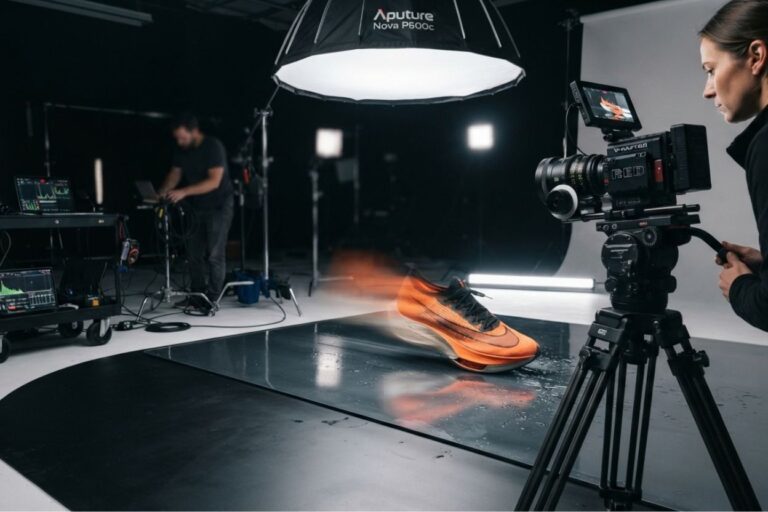
Product and lifestyle video has become one of the most demanding categories in brand marketing. A running shoe has to hit the ground with believable weight. A dress has to move like real fabric. Water has to splash the way viewers expect. When motion looks even slightly artificial, audiences notice instantly, and the brand looks cheaper for it.
That’s why more teams are comparing AI video tools not on how impressive a demo looks, but on how close the output gets to something they can actually publish. Two very different options often come up: Kling 3.0, available inside the Animx workspace, and Adobe Firefly, which sits within Adobe’s Creative Cloud ecosystem. Both can be part of a professional workflow. The question is which one gets your team from idea to usable, on-brand video with less friction.
Branding Needs Believable Motion, Not Just Pretty Frames
For product and lifestyle content, brand-ready video needs to:
- Show products and people moving in a physically convincing way
- Keep the product, model or setting consistent throughout the shot
- Deliver native formats for feeds, stories and widescreen placements
- Match the look of the brand’s existing photography and campaigns
A tool that produces a beautiful still frame but unnatural motion won’t survive a brand review. Motion quality is where the real comparison starts.
A Closer Look at Kling 3.0 on Animx
Kling 3.0 is Kuaishou’s flagship AI video model, built specifically for grounded, realistic motion. Its focus is physics: the way a runner’s gait carries momentum, how a jacket swings with weight, how water ripples and splashes. Subjects stay consistent across the shot and framing remains steady, which is exactly what product and lifestyle footage requires.
On Animx, Kling 3.0 runs directly in the browser with no waitlist and no separate Kuaishou subscription. It supports:
- Text-to-video for generating scenes from a written brief
- Image-to-video for animating an approved product shot or key visual
- Up to 4 reference images to keep a character, product or environment consistent
- Native 16:9, 9:16 and 1:1 formats for widescreen, vertical and square placements
- Clips of up to 15 seconds, long enough for most social ads and product loops
Kling 3.0 generates video only, without native audio. For sound, Animx makes it easy to pair it with models like Veo 3.1 or Sora 2 in the same workspace, or to add music and sound design in post.
Adobe Firefly and Its Design-First Mindset
Adobe Firefly comes from a different tradition. It grew out of Adobe’s professional creative tools and connects closely with Photoshop, Illustrator and Premiere Pro. For teams that already live in Creative Cloud, that integration is a big advantage: generated material flows straight into familiar editing and finishing tools. Adobe also positions Firefly with commercial use in mind, which many brand and legal teams value.
Firefly’s workflow generally treats generation as a starting point, with refinement happening afterwards in Adobe’s professional software. That gives designers and editors deep control, but it can add steps when a team simply needs realistic footage quickly.
Where the Two Feel Different in Practice
- Kling 3.0 on Animx: brief or product photo → realistic motion clip → publish or light edit
- Adobe Firefly: brief → draft → refinement and finishing inside Adobe tools
Neither is wrong. One is optimized for fast, physically convincing output; the other for integration with a professional post-production pipeline.
Handling Real Campaign Requirements
Product campaigns rarely need a single clip. Teams typically need:
- The same product shown in several scenes and seasons
- Vertical, square and widescreen versions
- Multiple variations for A/B testing
- Fast updates when stock, pricing or messaging changes
Kling 3.0’s native aspect ratios and image-to-video support help here: one approved product photo can become a vertical Reel, a square feed post and a widescreen banner clip without reshooting. On Animx, higher plans also allow several videos to render at the same time, so variations can be produced in one session. Firefly can produce strong results too, particularly in combination with Premiere Pro, but each variation is more likely to pass through additional editing steps.
Working With Products, People and Environments
Consistency is critical when the hero of the video is a specific product or a recurring brand model. Kling 3.0’s reference images, up to four per generation, help lock in the look of a product, character or environment across a clip. For campaigns that need even more control, Animx lets teams switch to other models in the same workspace: Seedance 2.5 accepts up to nine references and offers start and end frame control, which is useful for product reveals that must finish on an exact packshot.
Firefly users can reach similar consistency, but usually by relying more on manual editing and compositing in Adobe’s software.
Speed vs Control: A Practical Trade-Off
Kling 3.0 on Animx favors:
- Realistic, physics-accurate motion out of the box
- Fast output with fewer steps
- Easy comparison with other top models in one workspace
Adobe Firefly favors:
- Tight integration with Photoshop, Illustrator and Premiere Pro
- Detailed manual control after generation
- A familiar environment for Creative Cloud teams
Scaling Brand Video Over Time
As content needs grow, workflow efficiency matters more than any single output. Animx scales by simplifying production: one subscription covers Kling 3.0 alongside Veo, Seedance, Sora, Wan and leading image models, credit costs are shown before each generation, and paid plans include commercial rights. Firefly scales through established Adobe design systems and dedicated editing teams, which suits larger in-house creative departments.
Which One Fits Your Workflow Better?
Choose Kling 3.0 on Animx if you produce product, fitness, sports, lifestyle or documentary-style content where realistic motion is essential, publish across several formats and want quick, ready-to-use clips, with the option to try other models when a shot calls for a different style or native audio.
Choose Adobe Firefly if your team already works inside Creative Cloud, relies on detailed post-production and prefers to refine every frame by hand within Adobe’s tools.
Final Thoughts
Both options are capable, but they serve different priorities. Kling 3.0 on Animx stands out for grounded, physically convincing motion, native formats for every major placement and a fast route from product photo to publishable clip, all within a workspace that also includes the other leading video and image models. Adobe Firefly remains a strong choice for teams that want generation tightly connected to professional editing software. The best tool is the one that matches how your team actually works day to day, and with free credits for new Animx accounts, it’s easy to put Kling 3.0 to the test with your own products.
