


There is a particular kind of buyer’s dilemma that only appears once the laptop itself has already been chosen. The machine is modern, fast and perfectly capable. It has the ports you expected. It runs everything you need. Yet the moment you try to turn it into a proper desk setup, the questions begin: external displays, charging, storage, Ethernet, audio, card readers, accessories. That is when the conversation shifts from “which laptop?” to “which dock?” — and in 2026, that often means deciding between a thunderbolt 4 dock and a newer Thunderbolt 5 option.
For anyone buying a dock today for a TB4 laptop, the instinctive reaction is understandable. If Thunderbolt 5 is newer and faster, why not just buy the newer thing and be done with it? The problem is that this logic only works if your desk actually needs what the newer standard offers. A dock is not a phone upgrade or a prestige purchase. It is infrastructure. Its value comes from how well it fits your laptop, your displays and your daily workflow — not from whether it sounds one generation newer.
That point matters even more in Apple’s current lineup. The latest MacBook Air with M5 still ships with two Thunderbolt 4 ports, while the standard M5 MacBook Pro still uses three Thunderbolt 4 ports. Only the M5 Pro and M5 Max MacBook Pro models move to Thunderbolt 5. Apple is not quietly phasing Thunderbolt 4 out of the mainstream MacBook experience; it is still using it on a significant part of the range.
So the real question is not whether TB5 is better in the abstract. It is whether a TB4 laptop owner should buy a TB4 dock that matches the machine, or stretch to TB5 for future-proofing. In most cases, the answer is more grounded than the marketing tends to suggest.
Start with the laptop you actually own
The easiest way to get this wrong is to buy for a hypothetical future setup rather than the machine currently sitting on your desk. If your laptop is a Thunderbolt 4 laptop, then a thunderbolt 4 dock is already aligned with the laptop’s native connectivity standard. On the current MacBook Air M5, for example, Apple lists two Thunderbolt 4 ports and support for up to two external displays. On the standard M5 MacBook Pro, Apple lists three Thunderbolt 4 ports and support for up to two external displays through Thunderbolt and HDMI. That makes TB4 a present-tense match, not a fallback.
This is why a good macbook air dock in 2026 does not need to be extravagant to make sense. If the laptop itself remains a Thunderbolt 4 machine, then a high-quality TB4 dock is still the most natural way to add desk connectivity without creating a mismatch between the dock’s capabilities and the host device’s own I/O. The same logic applies to many buyers looking for a macbook pro dock if they are using the standard M5 model rather than a Pro or Max tier.
What TB5 actually changes
None of that means Thunderbolt 5 is just marketing. It is a real upgrade. Intel says Thunderbolt 5 delivers 80 Gbps of bi-directional bandwidth and can reach up to 120 Gbps with Bandwidth Boost for display-heavy use cases. Intel also positions it as the stronger option for denser docking setups, more demanding displays and higher-performance accessory chains.
That sounds compelling, and for some users it is. But it only becomes compelling in practice when your desk is already pushing beyond what TB4 handles comfortably. If your setup is one or two external displays, a fast SSD, wired Ethernet, charging and the usual desktop accessories, TB4 is still firmly in its comfort zone. The raw gains of TB5 may be real, but they are not automatically visible in everyday use unless your environment is already unusually heavy.
Why TB4 remains the sensible buy for many people
The strongest case for buying a thunderbolt 4 dock today is simple: it solves the problem you actually have. Most people buying a dock are not building a miniature post-production studio. They are trying to make a laptop behave more cleanly at a desk. They want to arrive with one cable, light up an external monitor, recover their storage, regain network access, power the laptop and keep the desk from turning into an adapter museum.
TB4 still does this very well. It remains a mature, mainstream standard across current Apple laptops, and Apple’s own spec sheets make clear that it is still the default connectivity tier for the MacBook Air and standard MacBook Pro. That matters because it tells you where Apple still believes the majority of real-world workflows sit.
There is also a practical buying argument here. A dock should be judged less by theoretical peak numbers and more by friction. If a TB4 dock gives you the displays, ports and stability you need without compromise, then TB5 does not become the better purchase simply by existing. In many cases, it becomes a more expensive way of buying capacity you may not touch for years.
When buying TB5 for a TB4 laptop does make sense
That said, there are cases where buying TB5 for a TB4 laptop is not irrational. The clearest one is when you are not really buying for the current laptop alone. If you know the dock is meant to outlast the machine, and you expect your next laptop or your next desk build to move into more demanding territory, then buying into TB5 earlier can be a strategic choice rather than an overbuy.
The same applies if your desk is already evolving faster than your laptop. Perhaps your current TB4 laptop is still fine, but you are adding faster external storage, thinking about more advanced display setups, or planning a more creator-oriented environment over the next year or two. In that case, a TB5 dock can be viewed as forward-looking infrastructure. Intel explicitly positions Thunderbolt 5 around more ambitious display and accessory scenarios, so buying at that level for a future desk is not inherently unreasonable.
But this is an important distinction: that is no longer a “what is best for my TB4 laptop today?” purchase. It is a “what do I want my desk to become next?” purchase. Those are not the same decision.
MacBook Air buyers: don’t overcomplicate it
For anyone buying a macbook air dock, the answer is usually the clearest of all. Apple’s latest MacBook Air remains a Thunderbolt 4 laptop, and Apple says it supports up to two external displays. That means the most sensible dock choice for most buyers is still a strong TB4 dock that offers clean desk integration, enough useful ports and solid display support.
This is because the MacBook Air is still fundamentally about balance. It is a portability-first machine that becomes more useful at a desk with the right accessories. A good macbook air dock should enhance that flexibility, not drag the setup into workstation overkill. Buying TB5 for an Air can make sense if you are deliberately planning ahead, but for most actual Air owners, TB4 remains the neatest fit.
MacBook Pro buyers: it depends which Pro you mean
For a macbook pro dock, the answer is more tiered. If you are using the standard M5 MacBook Pro, you are still on Thunderbolt 4 natively, so a TB4 dock remains a highly logical choice. Apple gives that machine three Thunderbolt 4 ports and support for up to two external displays, which means the laptop itself is still aimed at a setup that TB4 comfortably serves.
If, however, you are using an M5 Pro or M5 Max MacBook Pro, Apple has already moved you into the Thunderbolt 5 part of the lineup. Those models support more external displays and more ambitious desktop configurations. That does not mean every Pro or Max owner must immediately buy a TB5 dock, but it does mean the argument becomes stronger. At that point, the dock is no longer just a convenience accessory. It is increasingly part of a higher-end workstation structure.
Where UGREEN fits naturally into this decision
One useful sign that the market itself sees both standards as relevant is the way brands are now selling them side by side rather than treating TB5 as an outright replacement. UGREEN’s UK range, for example, includes both Thunderbolt 4 and Thunderbolt 5 docking options for Mac and Windows users. That feels like the right framing: this is not a clean old-versus-new swap, but a split between two levels of desk need.
That is also why choosing between them should be less about fear of missing out and more about honest setup planning. A good dock is not the one with the loudest spec sheet. It is the one that makes your laptop easier to live with every day.
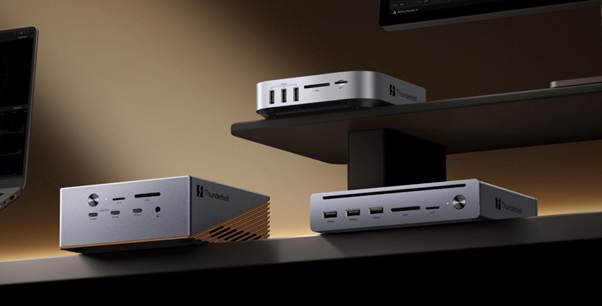
The practical answer
If you are buying a dock today for a TB4 laptop, a thunderbolt 4 dock is still the best buy for most people. It matches the native I/O of current MacBook Air and standard MacBook Pro models, it supports the sort of desks most users are actually building, and it avoids paying extra for bandwidth your current machine may never meaningfully exploit.
Buy TB5 if one of two things is true: either your desk is already becoming unusually demanding, or you are consciously buying for a future machine and a more ambitious workstation rather than the TB4 laptop you have now. If neither is true, TB4 remains the more proportionate answer.
Conclusion
Buying a dock for a TB4 laptop in 2026 is not really a choice between “good” and “better”. It is a choice between “appropriate now” and “potentially useful later”. For most users — especially those shopping for a macbook air dock or a macbook pro dock for the standard M5 model — TB4 remains enough, because Apple still builds those machines around Thunderbolt 4 and their likely desk use still fits comfortably within it.
TB5 is the right move when the dock is being bought not just for today’s TB4 laptop, but for tomorrow’s denser, more demanding desk. That is a perfectly valid reason to buy one. It is just not the default answer.
